COFFEE CULTURE
FOR STARBUCKS INDIA
Starbucks India wanted to make their app more engaging by letting customers book interactive coffee culture sessions with baristas at cafés across Mumbai. During my internship at Fractal Ink, I helped audit the existing app, identify usability gaps, and design a smoother booking workflow that connected research, UX, and UI to bring this new experience to life.
Brief details
Duration
4 MONTHS
Deliverable
APP INTEGRATION
Role
UI/UX Designer
TOOLS
Figma, FigJam, Miro
Project name
coffee culture
Client
STARBUCKS - India
Industry
Food and Beverage, Retail, Education
Client Provided Materials
Brand Guidelines: Official colors, typography, iconography, and visual style rules to ensure consistency.
Existing App Screens: Screenshots of the current app to understand layout, flow, and interactions.
Copy & Content: Text for barista talks, booking instructions, and descriptions of coffee culture events.
Images & Illustrations: High-quality images of Starbucks cafes, products, and baristas, along with supporting illustrations.
Design Constraints: Specifications regarding app responsiveness, platform guidelines, and interaction patterns.
Before starting the project, Starbucks India provided the following assets and guidelines:
The Challenge
Starbucks India wanted to transform its mobile app from a transactional tool into a hub for community engagement. Their goal was to connect customers with the brand on a deeper level by introducing "Barista Talks" interactive, bookable coffee culture sessions hosted by their expert baristas.
However, the existing app was designed primarily for ordering and payments, with a complex navigation that made it difficult to seamlessly integrate this new feature. Our challenge was to design an intuitive, user-friendly booking experience that not only simplified the process but also reflected Starbucks' premium brand identity.

The Process
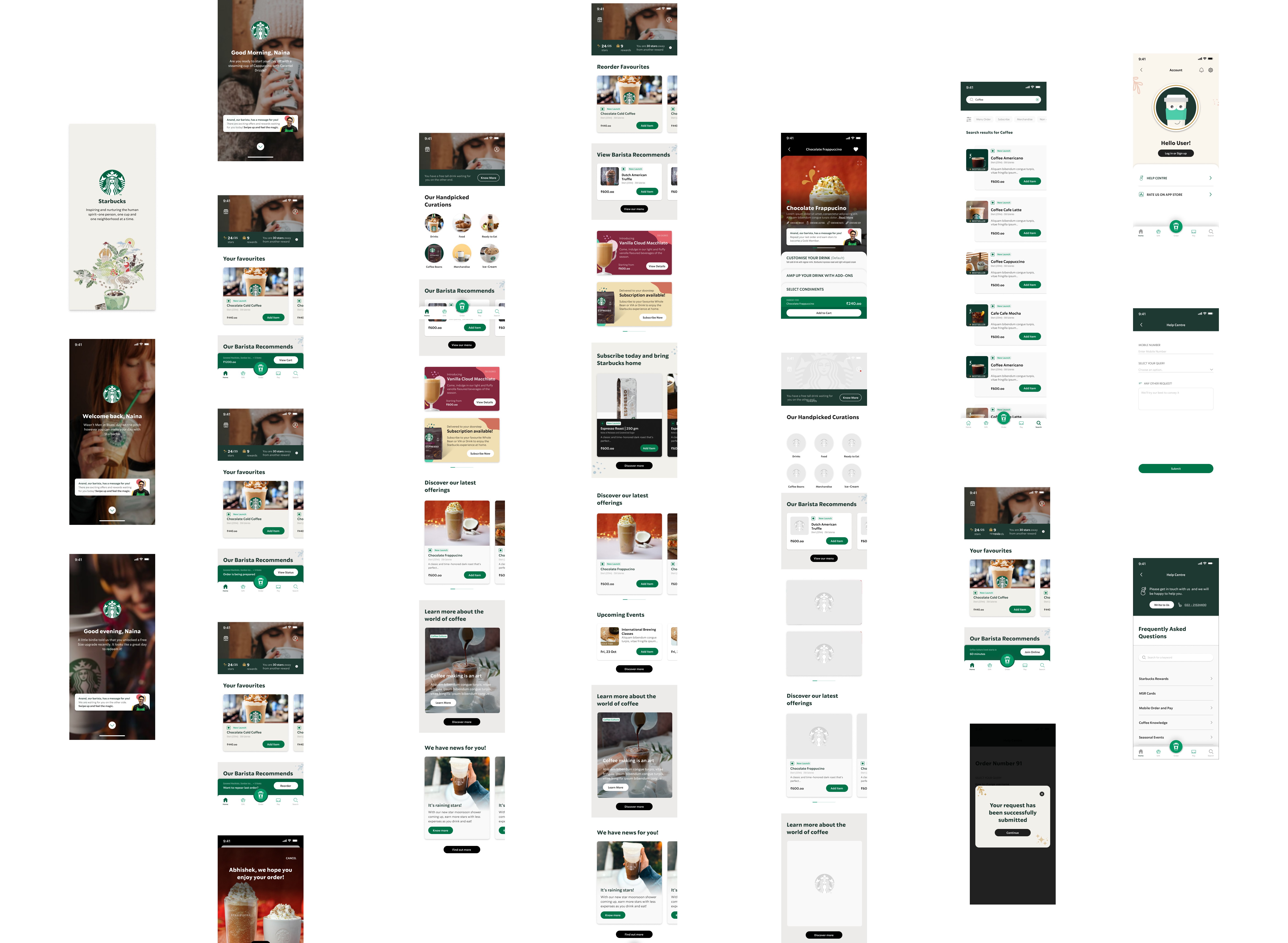
To kick off the project, we conducted a thorough analysis of the existing app. My team and I started with an expert review, using established usability principles to identify key pain points and friction in the current user flow.
This audit helped us understand where users were getting stuck and where we could simplify the navigation.
With a clear understanding of the user journey, we mapped out the existing app's screens and identified a more direct and efficient way to integrate the new booking feature.
I then created rough drafts and sketches, outlining potential screen layouts, user interactions, and content placement to set the foundation for a seamless new workflow.
This initial research and discovery phase was crucial. It ensured that our design decisions were grounded in real user behavior and aligned with Starbucks' mission to enhance customer engagement and community.
Understanding the User Journey
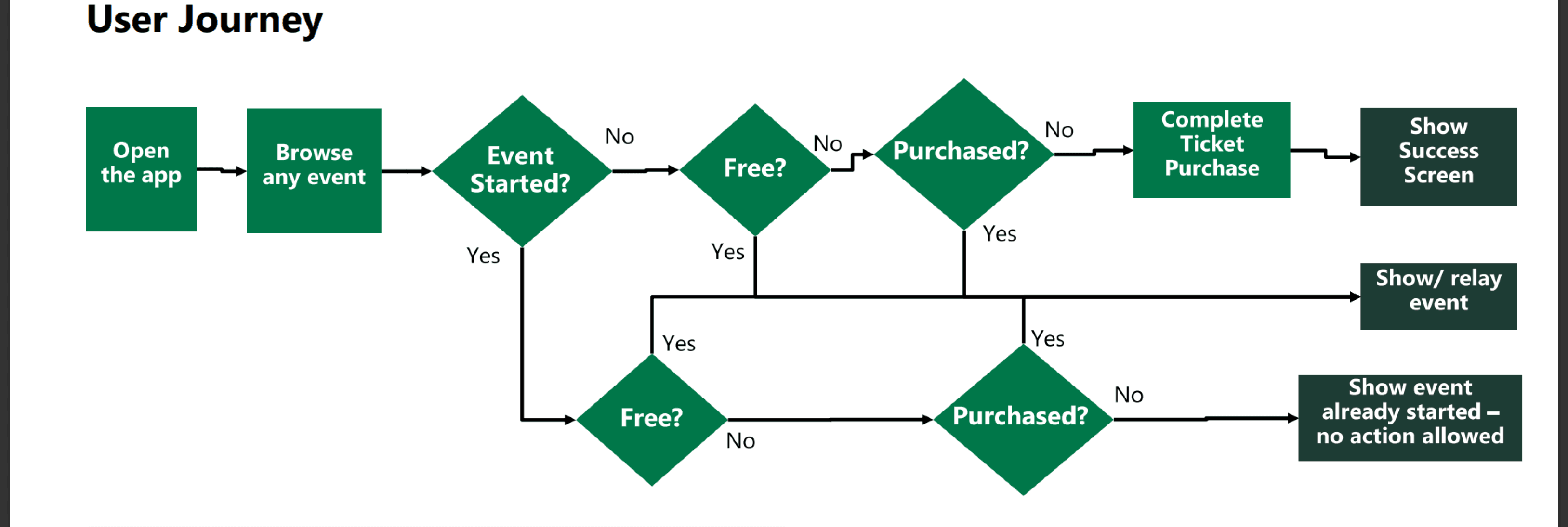
After our initial audit, we mapped the existing user journey to pinpoint the precise moments of friction. This complex flowchart represents the user's convoluted path to booking an event, revealing multiple decision points and
dead ends.
Ideation and Brainstorming
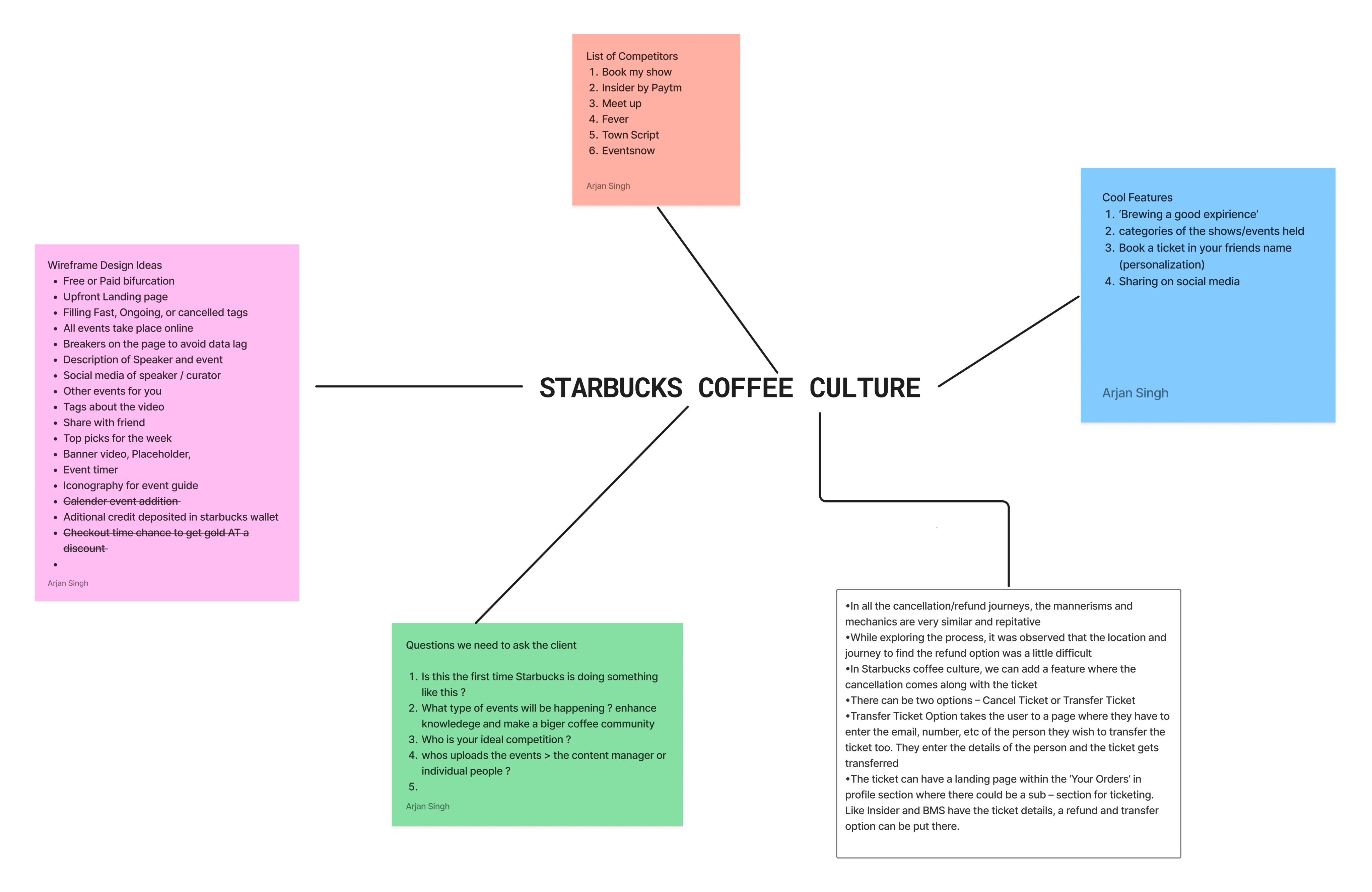
With the pain points mapped, we held a brainstorming session to turn insights into actionable solutions. Our ideas were organized into four key areas:
Competitive Analysis: Studied booking apps like Book My Show and Insider to learn best practices for flows and ticket management.
Feature Exploration: Suggested features such as personalized recommendations, event sharing, and direct live session links.
Client Alignment: Framed key questions for Starbucks around content management and competitive positioning.
Pain Point Solutions: Focused on simplifying the refund and cancellation process, which was unnecessarily complex.
This session bridged the gap between research and design, giving us a clear direction for the wireframes and booking workflow ahead.
The audit revealed three key issues in the existing flow:
Decision Overload: Users faced too many “yes/no” checks (free? purchased?) before booking, leading to confusion and drop-offs.
Confusing Navigation: Paths for free and paid events overlapped in illogical ways, frustrating users.
Inefficient Flow: Viewing a live event required multiple unnecessary steps, making the experience slow and complicated.
Mapping this journey was crucial—it gave us a clear visual of the problems, helping us streamline the path into a simpler, more intuitive booking experience.
The Challenge
Starbucks India wanted to transform its mobile app from a transactional tool into a hub for community engagement. Their goal was to connect customers with the brand on a deeper level by introducing "Barista Talks" interactive, bookable coffee culture sessions hosted by their expert baristas.
However, the existing app was designed primarily for ordering and payments, with a complex navigation that made it difficult to seamlessly integrate this new feature. Our challenge was to design an intuitive, user-friendly booking experience that not only simplified the process but also reflected Starbucks' premium brand identity.
THE REDESIGN
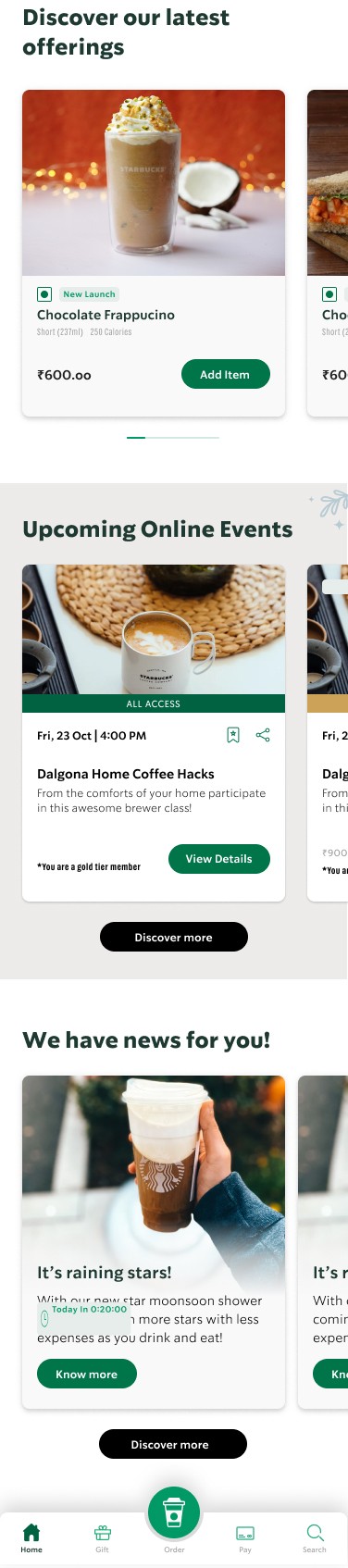
SCREEN 1 - The New Dashboard
The redesigned dashboard was created to transform the app into a hub for community. Here are the key design decisions behind this screen:
Strategic Placement: We gave Upcoming Online Events a prominent, dedicated section on the dashboard to ensure the new feature was immediately discoverable.
Clear Call-to-Action: Each event card is designed for clarity, with key details and a direct "Join Event" button that creates a simple, intuitive path for the user.
Holistic Experience: The new design successfully balances community-focused content with existing product promotions, expanding the app's purpose while maintaining its core functionality.

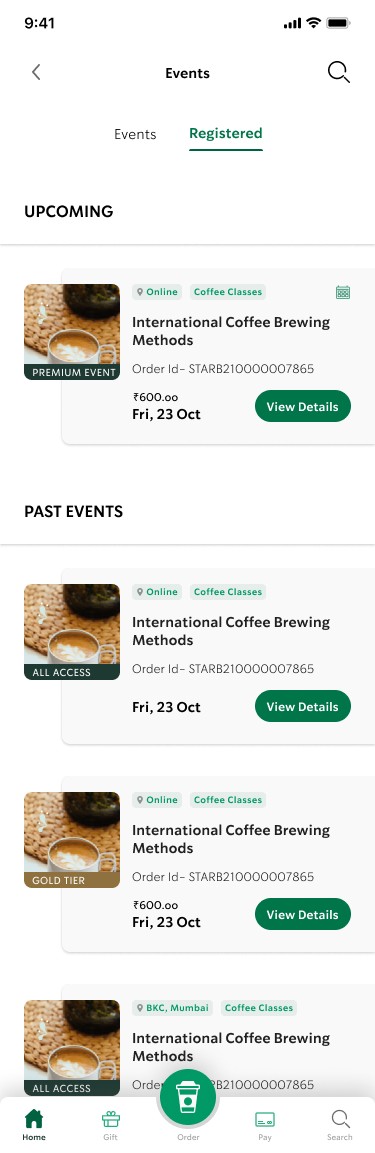
SCREEN 2 - The Events Hub
This screen serves as the user's central hub for managing their "Coffee Culture" journey. We designed it to be a clear, organized space where users can easily browse and keep track of events.
Intuitive Navigation: We designed a simple tab system to help users easily navigate between browsing all Upcoming and Past events and viewing only their Registered sessions.
Clear Information Hierarchy: Each event card is designed to provide all essential details at a glance, including event type (online or in-person), access level, price, and date.
User-Focused Layout: By clearly separating upcoming events from past ones, we eliminated clutter and ensured users can always focus on the most relevant information.
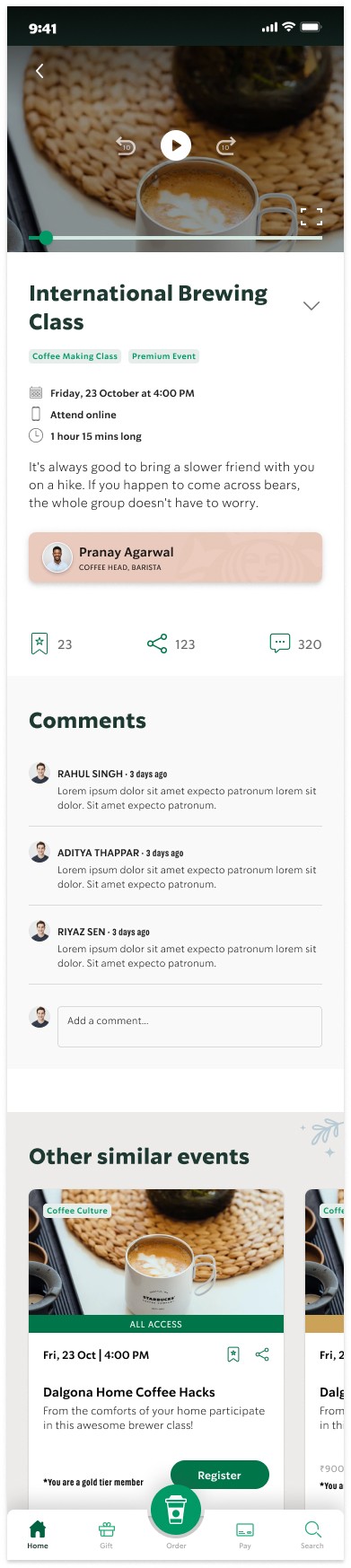
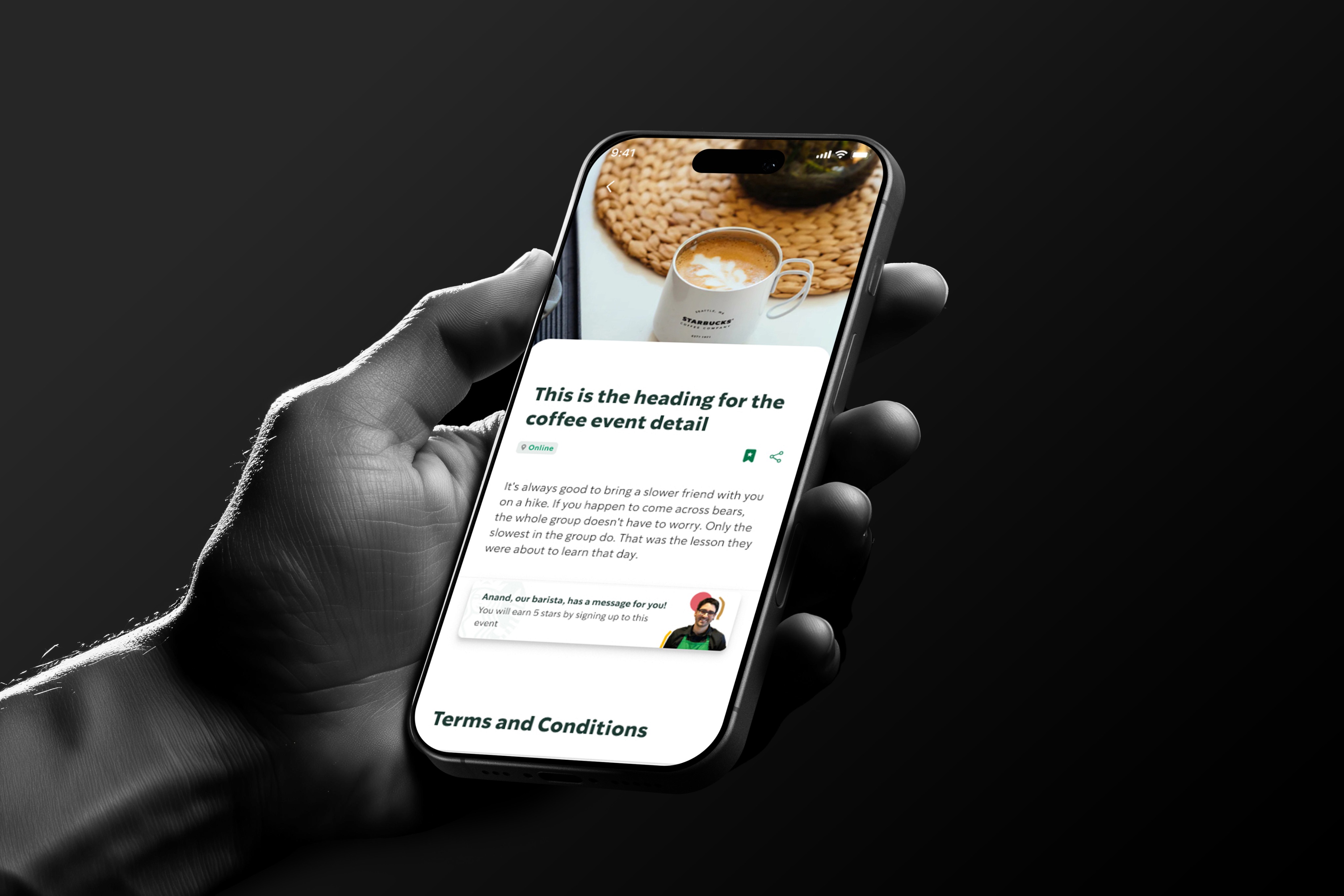
SCREEN 3 - The Event Details Page
This screen is the final destination in the user's journey, designed to provide all the necessary details and inspire them to register. The goal was to make this page feel both informative and personal.
Personal Connection: We added a dedicated section featuring the barista hosting the event. This humanizes the experience and strengthens the user's connection to the brand's community.
Clear and Concise: The page leads with an immersive image and a clear heading, presenting all critical details and event terms without clutter.
Seamless Registration: The booking process is streamlined at the bottom of the screen with a prominent "Free" tag and a simple count for attendees.
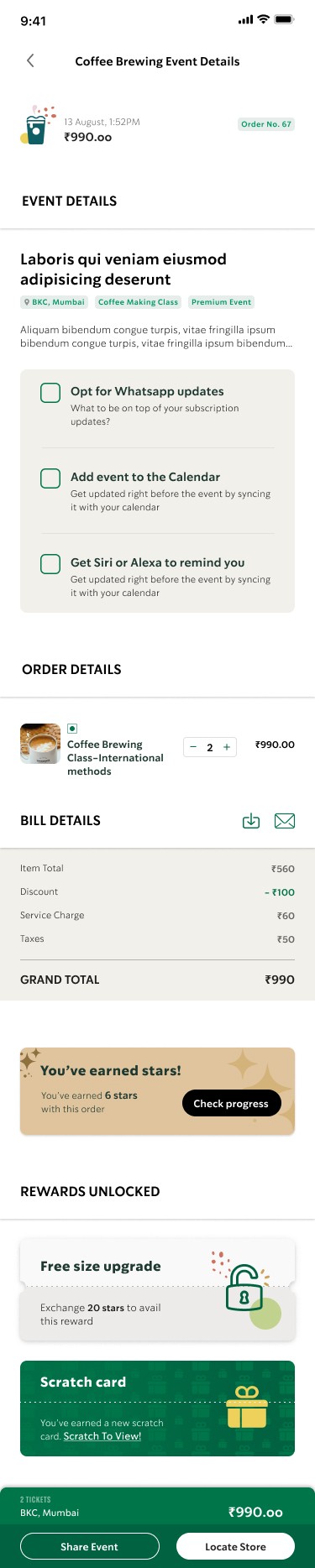
SCREEN 4 - Confirmation and Rewards
This confirmation screen serves as more than a simple receipt.
Seamless Rewards Integration: We integrated the new event feature directly into the existing rewards ecosystem. By showing Stars earned and unlocked rewards, we immediately connect the new experience to the user's personal loyalty journey.
Clear Transactional Confirmation: The screen provides a clear order number and detailed bill, giving the user peace of mind that their registration was successful.
Encouraging Continued Engagement: We designed this screen to encourage continued interaction by offering options to add the event to their calendar, share it with friends, and find the nearest store, all designed to ensure a smooth transition to the event itself.
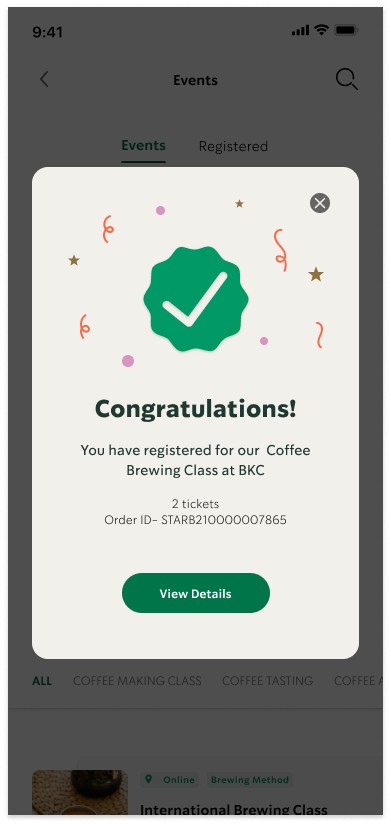
SCREEN 5 - Confirmation Modal
This success modal provides immediate, positive feedback after a user successfully registers. It's designed to be a clear and joyful conclusion to the booking process.
Immediate Reinforcement: The celebratory visuals—including a bold "Congratulations!" heading and confetti—provide instant and positive confirmation that the task is complete.
Clear Next Steps: The modal is intentionally brief, focusing only on the core confirmation and a single, prominent "View Details" button that directs the user to the next logical screen.
Building Trust: By providing a clear and joyful confirmation, this screen builds user confidence and reinforces trust in the app's new functionality.
SCREEN 6 - My Events
This screen is accessible from the user's profile, providing a personalized hub for all events they have registered for. It was designed to give users a clear and accessible record of their "Coffee Culture" experiences.
Organized for Clarity: By separating events into "Upcoming" and "Past" sections, we made it simple for users to manage their schedule and easily reference previous sessions.
Personalized History: This screen serves as a personal record of the user's engagement, reinforcing their connection to the brand and encouraging repeat participation.
Consistent Experience: The event cards on this page maintain the same design and information hierarchy as the main events list, ensuring a seamless and predictable user experience.
Final Thoughts
This project was a success in transforming the Starbucks app from a purely transactional platform into a vibrant community hub. By grounding our work in user research and following a methodical design process, we were able to create a seamless and engaging experience.
The final design not only simplifies the booking flow but also strengthens the brand's connection with its customers, proving that a user-centered approach can lead to meaningful business results and a superior user experience.
Get in touch
COFFEE
CULTURE
FOR STARBUCKS INDIA
Starbucks India wanted to make their app more engaging by letting customers book interactive coffee culture sessions with baristas at cafés across Mumbai. During my internship at Fractal Ink, I helped audit the existing app, identify usability gaps, and design a smoother booking workflow that connected research, UX, and UI to bring this new experience to life.
Client Provided Materials
Before starting the project, Starbucks India provided the following assets and guidelines:
Brand Guidelines: Official colors, typography, iconography, and visual style rules to ensure consistency.
Existing App Screens: Screenshots of the current app to understand layout, flow, and interactions.
Copy & Content: Text for barista talks, booking instructions, and descriptions of coffee culture events.
Images & Illustrations: High-quality images of Starbucks cafes, products, and baristas, along with supporting illustrations.
Design Constraints: Specifications regarding app responsiveness, platform guidelines, and interaction patterns.
The Process
To kick off the project, we conducted a thorough analysis of the existing app. My team and I started with an expert review, using established usability principles to identify key pain points and friction in the current user flow.
This audit helped us understand where users were getting stuck and where we could simplify the navigation.
With a clear understanding of the user journey, we mapped out the existing app's screens and identified a more direct and efficient way to integrate the new booking feature.
I then created rough drafts and sketches, outlining potential screen layouts, user interactions, and content placement to set the foundation for a seamless new workflow.
This initial research and discovery phase was crucial. It ensured that our design decisions were grounded in real user behavior and aligned with Starbucks' mission to enhance customer engagement and community.
Understanding the User Journey
After our initial audit, we mapped the existing user journey to pinpoint the precise moments of friction. This complex flowchart represents the user's convoluted path to booking an event, revealing multiple decision points and
dead ends.
The audit revealed three key issues in the existing flow:
Decision Overload: Users faced too many “yes/no” checks (free? purchased?) before booking, leading to confusion and drop-offs.
Confusing Navigation: Paths for free and paid events overlapped in illogical ways, frustrating users.
Inefficient Flow: Viewing a live event required multiple unnecessary steps, making the experience slow and complicated.
Mapping this journey was crucial—it gave us a clear visual of the problems, helping us streamline the path into a simpler, more intuitive booking experience.
Ideation and Brainstorming
With the pain points mapped, we held a brainstorming session to turn insights into actionable solutions. Our ideas were organized into four key areas:
Competitive Analysis: Studied booking apps like Book My Show and Insider to learn best practices for flows and ticket management.
Feature Exploration: Suggested features such as personalized recommendations, event sharing, and direct live session links.
Client Alignment: Framed key questions for Starbucks around content management and competitive positioning.
Pain Point Solutions: Focused on simplifying the refund and cancellation process, which was unnecessarily complex.
This session bridged the gap between research and design, giving us a clear direction for the wireframes and booking workflow ahead.
THE REDESIGN
SCREEN 1
The New Dashboard
The redesigned dashboard was created to transform the app into a hub for community. Here are the key design decisions behind this screen:
Strategic Placement: We gave Upcoming Online Events a prominent, dedicated section on the dashboard to ensure the new feature was immediately discoverable.
Clear Call-to-Action: Each event card is designed for clarity, with key details and a direct "Join Event" button that creates a simple, intuitive path for the user.
Holistic Experience: The new design successfully balances community-focused content with existing product promotions, expanding the app's purpose while maintaining its core functionality.
SCREEN 2
The Events Hub
This screen serves as the user's central hub for managing their "Coffee Culture" journey. We designed it to be a clear, organized space where users can easily browse and keep track of events.
Intuitive Navigation: We designed a simple tab system to help users easily navigate between browsing all Upcoming and Past events and viewing only their Registered sessions.
Clear Information Hierarchy: Each event card is designed to provide all essential details at a glance, including event type (online or in-person), access level, price, and date.
User-Focused Layout: By clearly separating upcoming events from past ones, we eliminated clutter and ensured users can always focus on the most relevant information.
SCREEN 4
Confirmation and Rewards
This confirmation screen serves as more than a simple receipt.
Seamless Rewards Integration: We integrated the new event feature directly into the existing rewards ecosystem. By showing Stars earned and unlocked rewards, we immediately connect the new experience to the user's personal loyalty journey.
Clear Transactional Confirmation: The screen provides a clear order number and detailed bill, giving the user peace of mind that their registration was successful.
Encouraging Continued Engagement: We designed this screen to encourage continued interaction by offering options to add the event to their calendar, share it with friends, and find the nearest store, all designed to ensure a smooth transition to the event itself.
SCREEN 5
Confirmation Modal
This success modal provides immediate, positive feedback after a user successfully registers. It's designed to be a clear and joyful conclusion to the booking process.
Immediate Reinforcement:
The celebratory visuals—including a bold "Congratulations!" heading and confetti—provide instant and positive confirmation that the task is complete.
Clear Next Steps: The modal is intentionally brief, focusing only on the core confirmation and a single, prominent "View Details" button that directs the user to the next logical screen.
Building Trust: By providing a clear and joyful confirmation, this screen builds user confidence and reinforces trust in the app's new functionality.
Back
Project name
coffee culture
Client
STARBUCKS - India
Industry
Food and Beverage, Retail, Education
Role
UI/UX Designer
Duration
4 MONTHS
TOOLS
Figma, FigJam, Miro
Deliverable
APP INTEGRATION
SCREEN 6
My Events
This screen is accessible from the user's profile, providing a personalized hub for all events they have registered for. It was designed to give users a clear and accessible record of their "Coffee Culture" experiences.
Organized for Clarity: By separating events into "Upcoming" and "Past" sections, we made it simple for users to manage their schedule and easily reference previous sessions.
Personalized History: This screen serves as a personal record of the user's engagement, reinforcing their connection to the brand and encouraging repeat participation.
Consistent Experience: The event cards on this page maintain the same design and information hierarchy as the main events list, ensuring a seamless and predictable user experience.
Brief details